如有需要您可以簡單輕鬆地於帳單中顯示稅務編號。
方法1:購買時輸入公司名稱及稅務編號
1. 當您選擇好需要購買的服務後,於最後一步輸入會員資料時,輸入公司名稱及稅務編號

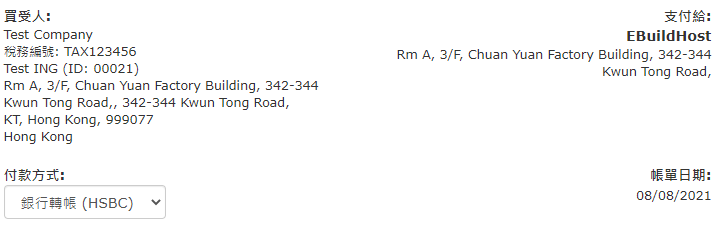
2. 之後帳單便會顯示公司名稱及稅務編號
方法2:購買後再輸入稅務編號
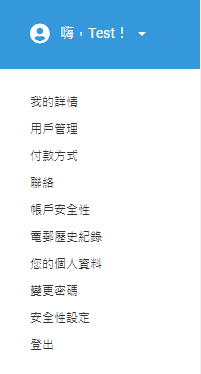
1. 登入客戶專區後,點擊右上角您的帳戶然後點選下拉選單的"我的詳情"
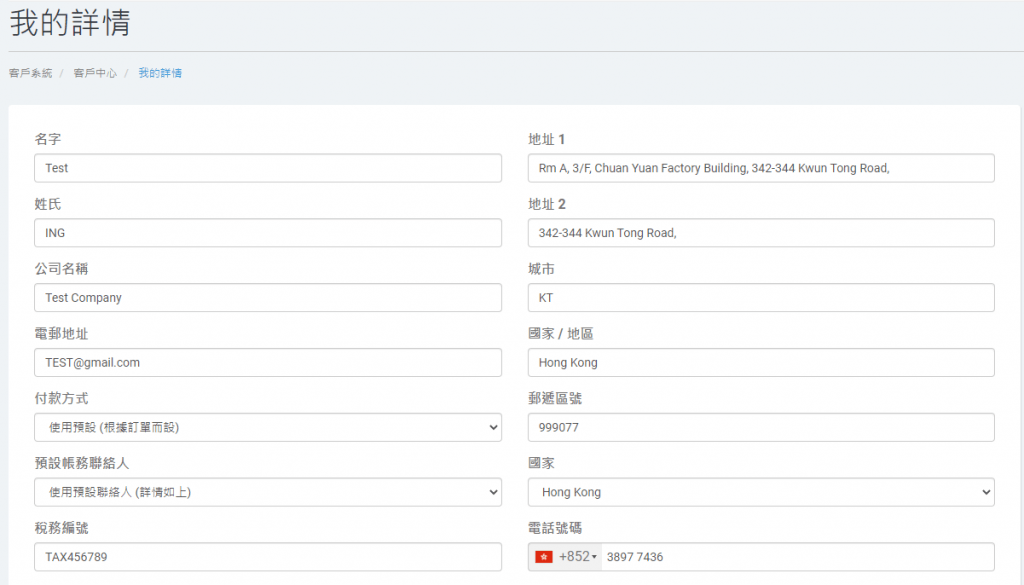
2. 您就可以隨時更改您的公司名稱以及稅務編號

如有需要您可以簡單輕鬆地於帳單中顯示稅務編號。
1. 當您選擇好需要購買的服務後,於最後一步輸入會員資料時,輸入公司名稱及稅務編號
2. 之後帳單便會顯示公司名稱及稅務編號
1. 登入客戶專區後,點擊右上角您的帳戶然後點選下拉選單的"我的詳情"
2. 您就可以隨時更改您的公司名稱以及稅務編號